First-time fix, not first-time guess.
A scheduler tells a technician where to go. ServiceCPQ tells them what to fix. Work orders arrive as a feed — agents diagnose the fault, pre-attach the part and the fix, and the technician executes, with parts, warranty and invoicing following automatically. Built for heavy, industrial and medical equipment across the Americas and Europe.
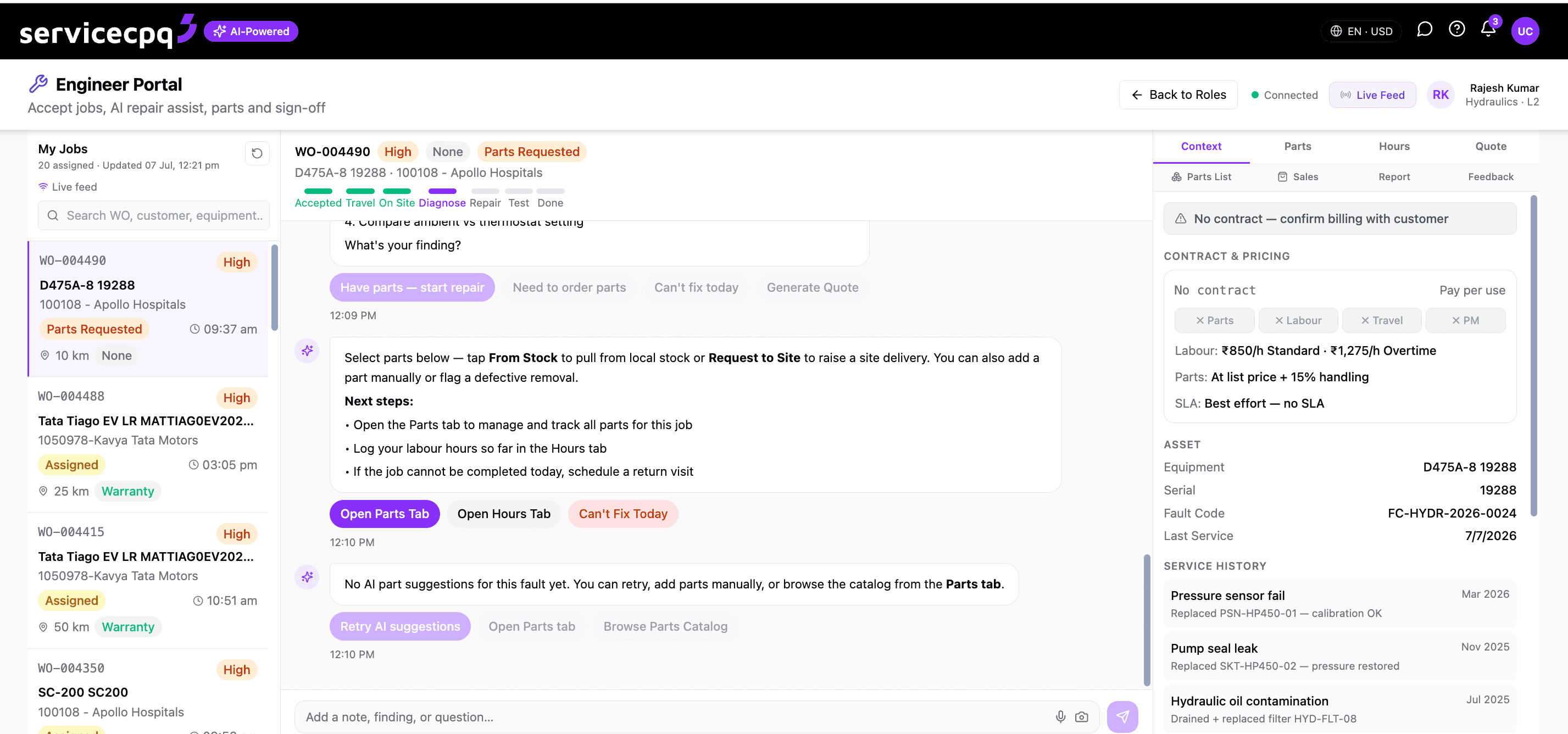
app.servicecpq.com — Engineer Portal
A scheduler tells a technician where to go. A graph tells them what to fix.
The work order and the money it moves sit on the same graph.
A work order isn’t a ticket in isolation. On the knowledge graph it connects to the exact machine and its service history, the parts that fix the fault, the warranty or contract that pays for it, and the invoice that closes it. Six roles — service centre, engineer, dealer, parts, warranty and contracts — work the same record, so nothing is re-keyed and nothing falls between systems.
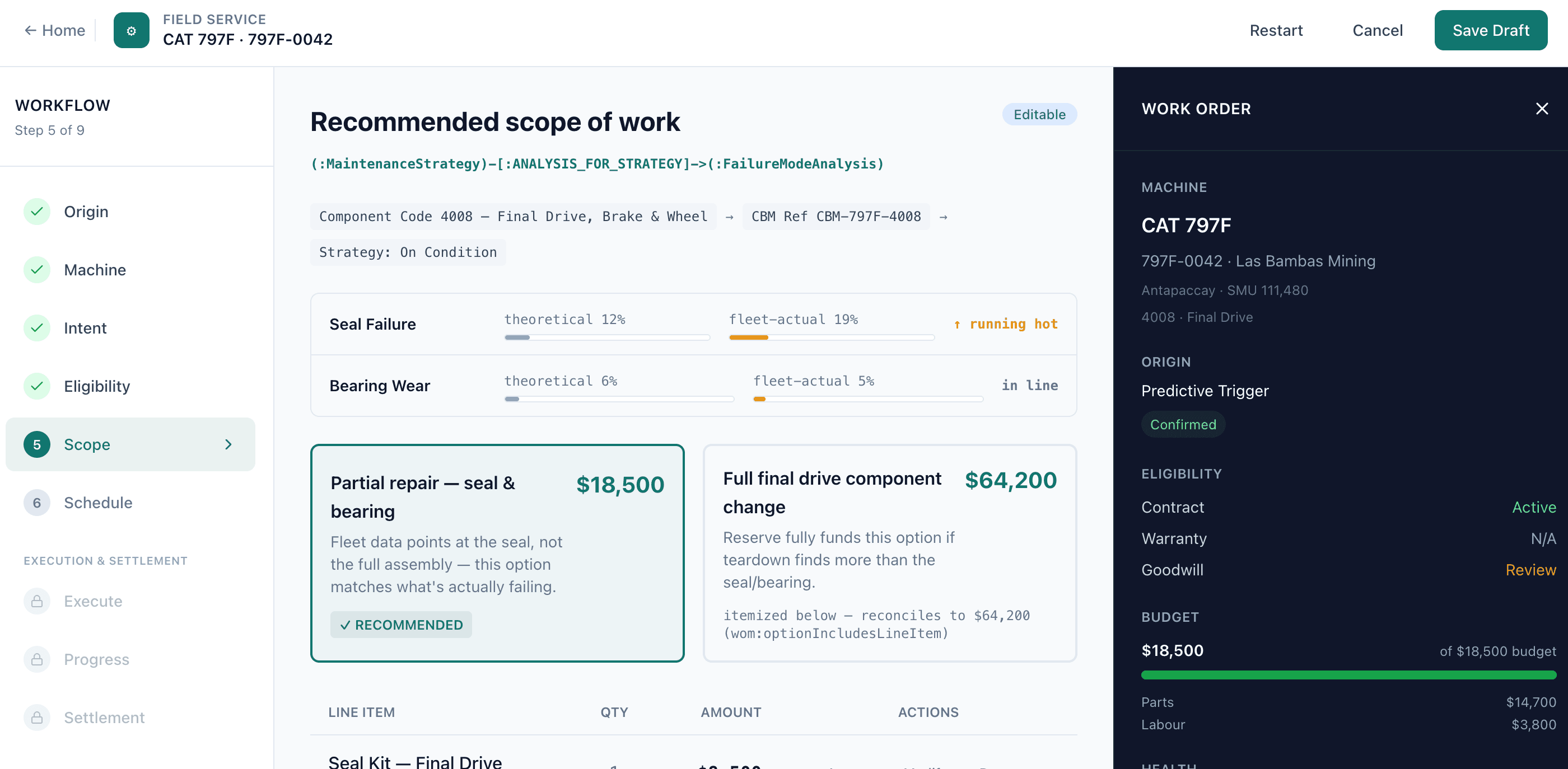
Work order copilot, powered by the knowledge graph
The same loop that runs the platform — compressed into one work order.
A fault code opens the work order before the phone rings.
Condition alerts and fault codes don't wait for a customer to call. ServiceCPQ turns the signal itself into a diagnosed, parts-attached work order automatically.
A fault code or condition alert arrives from the machine, telemetry feed or monitoring system — no customer phone call required.
The alert is matched to the machine, its history and the likely fix on the knowledge graph, and severity is scored.
A work order is opened automatically with diagnosis, parts and entitlement pre-attached, ready for dispatch.
Everything the technician needs, on the same work order.
Field engineers and shop technicians work one copilot — diagnosis, parts, hours and commercial close — instead of a form to fill in and three systems to reconcile.
Jobs arrive ranked by urgency and location, not as a flat ticket queue — the technician sees what to fix next, not just what came in.
Suggested fault and fix, grounded in telemetry, fault codes and service history for that exact machine — before the tech leaves for site.
The fault code maps straight to the parts that resolve it, so the right part is identified up front instead of on the second visit.
The copilot proposes the likely parts and quantities from historical repairs of the same fault pattern, with a confidence score.
Labour hours are standardised against a job library, so billing and productivity are consistent across every engineer and dealer.
Field and shop hours, travel and expenses are captured on the work order and routed for approval — no separate timesheet system.
Live stock, price and ETA are checked against ERP before a promise is made, so the tech commits to a date the parts can actually meet.
Parts, labour and contract terms roll into the invoice automatically the moment the work order closes.
If the repair is covered, the warranty claim is drafted before the technician leaves site — not reconstructed weeks later.
From the call centre feed to the engineer feed, one work order.
A call comes in, a case is triaged, and a work order is created — the same record follows the job through scheduling, dispatch, execution and closure, with nothing re-keyed along the way.
Every parts request, checked against real inventory.
Natural-language parts search finds the right part and checks price and margin in one step — no catalog spelunking.
Live stock and availability checked against SAP before a promise is made to the customer.
Stock allocated, stock transport orders and purchase requisitions raised automatically when a part isn't local.
Minimum-stock levels tracked per location, so fast-moving parts are replenished before they run out on the van.
Parts demand and repeat repairs surface upsell and renewal leads back to sales instead of disappearing after the job.
Native connectors keep parts, stock and orders in sync with your ERP of record.
Parts, stock, allocation, stock transport orders and purchase requisitions stay in sync with SAP or your ERP of record through native connectors — the ERP stays the system of record, field service runs the work.
Every closed job becomes the right invoice, automatically.
Standard service jobs invoiced directly from the closed work order.
Work covered by warranty raises a claim into the Warranty Hub instead of an invoice.
Work covered by a maintenance or service contract bills against the Contract Hub instead.
Two hubs decide how a job gets paid.
Every warranty-covered work order routes here for entitlement checks, adjudication and settlement — the same engine behind Warranty Automation.
Executes scheduled work under service contracts — planned maintenance visits, PM plans and recurring jobs — and raises the corresponding invoice.
In final commercial discussions with a medical-equipment manufacturer to replace SAP and a third-party application with ServiceCPQ’s feed-based field service.
Frequently asked questions
Field service management software runs the work a service organisation does in the field and the shop — from the moment a fault or request becomes a work order, through dispatch, diagnosis and parts, to close, invoice and warranty. ServiceCPQ's field service is built on one knowledge graph so the work order, the parts, the entitlement and the finance all reference the same record instead of separate systems.
First-time fix means resolving the job on the first visit instead of returning for the right part or the right diagnosis. The copilot reads fault codes, telemetry and service history for that exact machine, proposes the likely fix and parts before dispatch, and checks parts availability inline — so the technician arrives with the correct part and context already in hand.
Yes. A fault code or condition alert from the machine or a monitoring feed is matched to the machine and its history on the knowledge graph, severity is scored, and a work order is opened automatically with diagnosis, parts and entitlement pre-attached — before anyone dials in.
It is built for machinery manufacturers and their dealers — heavy equipment (construction, mining and road-building), industrial equipment, and medical equipment — across the Americas and Europe, where field and shop technicians service high-value, config-heavy machines under warranty and service contracts.
Yes. Parts, stock, allocation, stock transport orders and purchase requisitions stay in sync with SAP or your ERP of record through native connectors, so the ERP remains the system of record while field service runs the work.